
Before You Submit a Withdrawal
Withdrawing on ROARBET88 is designed to be simple: confirm your bank details, enter an amount, submit the request, then track your status in transaction history. If you joined a promotion, make sure any play-through rules are completed first so your request doesn’t get delayed.
Withdrawal Steps (With Images)
Follow the steps in order. Tap an image to open it bigger in a new tab.
-
1. Open Withdraw and confirm your bank details
Go to the Withdraw page and double-check your bank info (account name + number). When everything looks correct, proceed with the withdrawal option shown on the page.
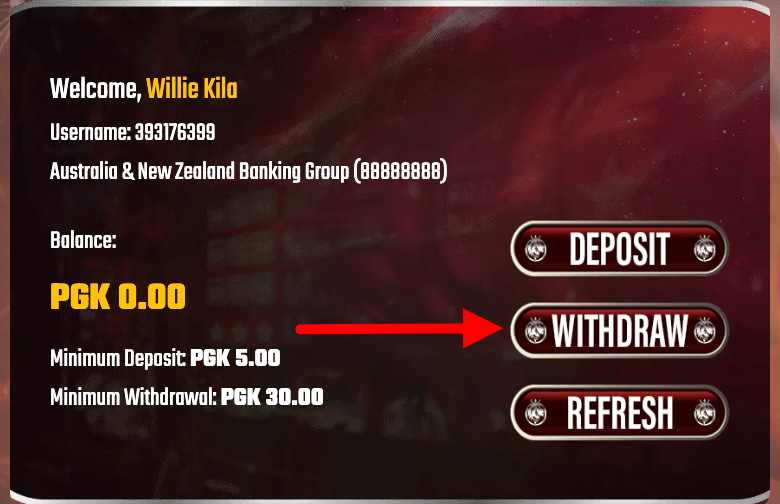 Screenshot: Open Withdraw and verify bank details before continuing.
 -
2. Enter the amount you want to cash out
Type the exact amount you want to withdraw. If your bank has transfer limits, consider withdrawing in smaller amounts to avoid failed transactions.
 Screenshot: Enter your withdrawal amount.
 -
3. Submit the request
Tap Submit to send your withdrawal request. The system will queue it for processing.
Tip: If your withdrawal is blocked, it’s often due to incomplete turnover requirements. Play a bit more and try again, or ask Live Chat to confirm what’s pending. Screenshot: Submit your withdrawal request.
 -
4. Track status in Transaction History
Open your Transaction History to see progress (e.g., pending, processing, completed). This is the fastest way to confirm if anything needs your attention.
 Screenshot: Check your withdrawal status in transaction history.
 -
5. Download your receipt after completion
When the withdrawal is marked Completed, open the attachment/receipt option to download your record. Keep it for reference if your bank asks for proof of transfer.
 Screenshot: Download your receipt from the attachment section.
Processing Time + Common Delays
Most withdrawals are handled quickly, but timing can vary depending on verification checks, banking hours, and whether your account is still clearing turnover rules.
- Typical processing: Many requests are completed within the same day (often under 24 hours).
- Turnover not cleared: Bonuses or deposit rules may prevent payout until requirements are met.
- Bank limits: Some PNG banks have daily caps—smaller withdrawals can help.
Withdrawal FAQs
Why is my withdrawal still pending?
Pending usually means your request is in the queue for review. If it’s taking too long, check Transaction History for notes, then contact Live Chat with your username and amount.
Can I withdraw to someone else’s bank account?
For security, withdrawals should go to your own bank account. If names don’t match, your request may fail verification.
Where do I get the receipt?
Once your withdrawal is completed, open Transaction History and download the attachment/receipt for that transaction.